SESSION PLAN
Six parts
PART 1
AI Tooling
Which agent, where you run it, and which model and effort for the job
PART 2
Standing instructions: AGENTS.md / CLAUDE.md
A file at the project root the agent reads every session.
PART 3
Software development lifecycle
The six stages, what changes when agents run inside them, and the intent.md that says what you are building before the agent starts.
PART 4
Good prompts vs. bad prompts
Worked examples of prompts that land and prompts that do not.
PART 5
Build a page about HTML/CSS/JavaScript
Turn the source guide into one index.html, with working demos, regular CSS beside Tailwind, and a structure you decided.
PART 6
Publish to GitHub Pages
Turn on GitHub Pages, confirm the live URL loads, and put that URL in your README.
PART 1 · AI TOOLING
LECTUREAI Tooling
Agents
Each company ships two agents. Ask either kind for a web page and you will get one. The difference is what happens next. A coding agent puts it in git, runs it, reads what broke, and shows you the change.
OPENAI
ANTHROPIC
The general agent
ChatGPT, with Work
Claude, with Cowork
The coding agent
Codex
Claude Code
Where you run them
Claude Code and Codex are the same agent wherever you open them. Only the surface changes: where the diff shows up, how much of your project is in view, and whether you have to be sitting at the machine.
WHAT IT IS
VS Code extension
A panel beside your files, diffs shown in the editor
VS Code terminal
The same agent, run as a command in the terminal
Standalone app
Its own desktop app, outside VS Code
On the web
Runs in a browser, on their machines not yours
Choosing your model
In general, we recommend using Sol/Astra or Opus/Fable unless you find that you are running out of tokens. At that point, you can mix the lower tier models in, or ask your agent which model/effort you should be using for a large task.
$
$$
$$$
$$$$
Luna
Haiku 4.5
Fast and affordable, with strong capability at the lowest cost
Terra
Sonnet 5
Combination of speed and intelligence
Sol
Opus 5
For complex agentic coding and enterprise work
Astra
Fable 5
For demanding reasoning and long-horizon agentic work
Choosing an effort level
Effort is a second setting, separate from the model. The axis here is time, meaning how long the model reasons before it answers. Higher effort means more thorough responses, but takes longer and uses your limits faster.
fastest
quick
thorough
long
longest
low
Fewest tokens, terse tool calls
medium
Balanced, with real savings
high
Full reasoning, the default
xhigh
Built for 30+ minute runs
max
No ceiling on thinking
PART 2 · STANDING INSTRUCTIONS: AGENTS.MD / CLAUDE.MD
LECTUREStanding instructions: AGENTS.md / CLAUDE.md
What is Markdown?
Markdown is plain text with lightweight formatting. A few characters add structure without a rich-text editor: # for headings, - for lists, backticks for code, and [labels](URLs) for links. AGENTS.md, CLAUDE.md, and README.md all use it, so you can read and edit the instructions an agent sees.
# Heading- List item`inline code`[Link text](https://example.com)**Bold text**What is AGENTS.md / CLAUDE.md?
AGENTS.md (Codex) or CLAUDE.md (Claude Code) is a file at the root of your project that the agent reads at the start of every session. The @ is an import: Claude Code reads the file named after it and pastes the contents into the session, so both agents work from the same brief and there is only ever one file to keep correct.
# Agent instructions ## The deliverable opens by double-clicking `index.html` This is the hard constraint, and almost everything below follows from it. Thework is graded by opening `index.html` from the file manager. No server, nobuild, no install. Whatever happens when that file is double-clicked is thewhole submission. So: - **`index.html` at the repository root is the entry point.** Not `src/`, not `dist/`, not `public/`. If the student names their project something else, the file they open is still `index.html` in the root.- **Supporting files are fine.** A `styles.css`, a `main.js`, an `images/` folder, a few extra pages linked from the first, all allowed, as long as `index.html` still opens and works by itself. Split things out when it makes the project easier to read; keep it in one file when splitting would just be ceremony.- **It has to work from `file://`.** Double-click `index.html` and everything loads. Two things quietly break under `file://` even though they work on a server, so avoid both: - `<script type="module">` and `import` are blocked by CORS. Use a plain `<script src="main.js"></script>` instead. - `fetch()` or `XMLHttpRequest` against a local file is also blocked. If the page needs data, put it in a JavaScript file as a variable and load it with a `<script>` tag.- **No build step and no install.** No `npm install`, no `package.json`, no bundler, no framework CLI, no TypeScript, no JSX that needs compiling, no `node_modules`. If a step in your plan requires a terminal command before the page works, the plan is wrong.- **No server and no backend.** Nothing that needs `node server.js`, a Python server, an API key, a database, or a network request to a backend.- **Relative paths only.** No leading `/` on links or asset paths. Under `file://` a leading `/` points at the root of the student's hard drive, so `/styles.css` will not load. Use `./styles.css` or a bare filename, and keep supporting files at or below the root folder. ## What is allowed from a CDN Loading a library from a CDN in a `<script>` or `<link>` tag is fine, becauseit needs no install. Tailwind's browser build is the common case: ```html<script src="https://cdn.jsdelivr.net/npm/@tailwindcss/browser@4"></script>``` ## Before you say you are done Check all of these: - [ ] `index.html` exists at the repository root- [ ] No `<script type="module">`, no `import`, no `fetch()` of a local file- [ ] No `package.json`, `node_modules`, or build output committed# Project Instructions @AGENTS.mdPART 3 · SOFTWARE DEVELOPMENT LIFECYCLE
LECTURESoftware development lifecycle
Traditional software development lifecycle (SDLC)
The software development lifecycle (SDLC) is the process that takes software from idea to production. Most organizations run some version of the same six stages, covering planning, design, building, testing, deploying, and maintaining software. Traditionally, each stage is a discrete phase owned by a different role. Product managers write requirements, technical architects turn them into designs, engineers build the designs, QA teams verify the software, release teams ship it, and operations monitors what is running. Work moves between the phases through documents, tickets, and sign-offs.
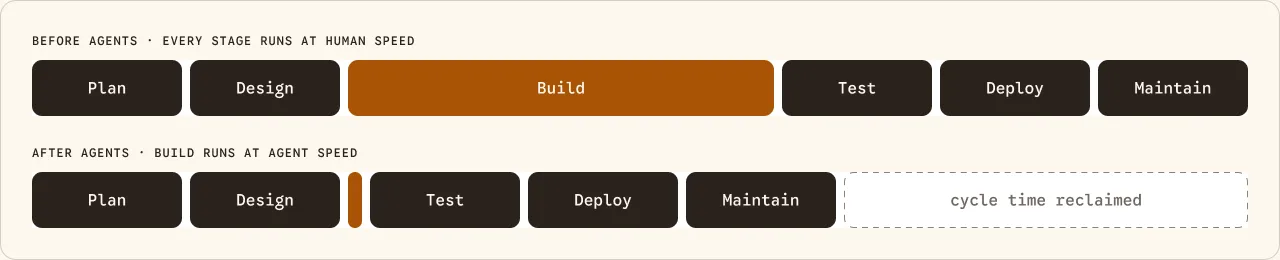
The bottleneck moved. Build now runs at agent speed while the stages around it still run at human speed.
academy.claude.com/courses/ai-native-sdlc-playbook/introduction (opens in a new tab)The AI-native SDLC
Redesigning those same six stages around agents turns the line into a loop. Agents synthesize requirements from real sources such as tickets, transcripts, and support threads, instead of a committee gathering them. Build produces generated code and tests against institutional knowledge kept in versioned files.
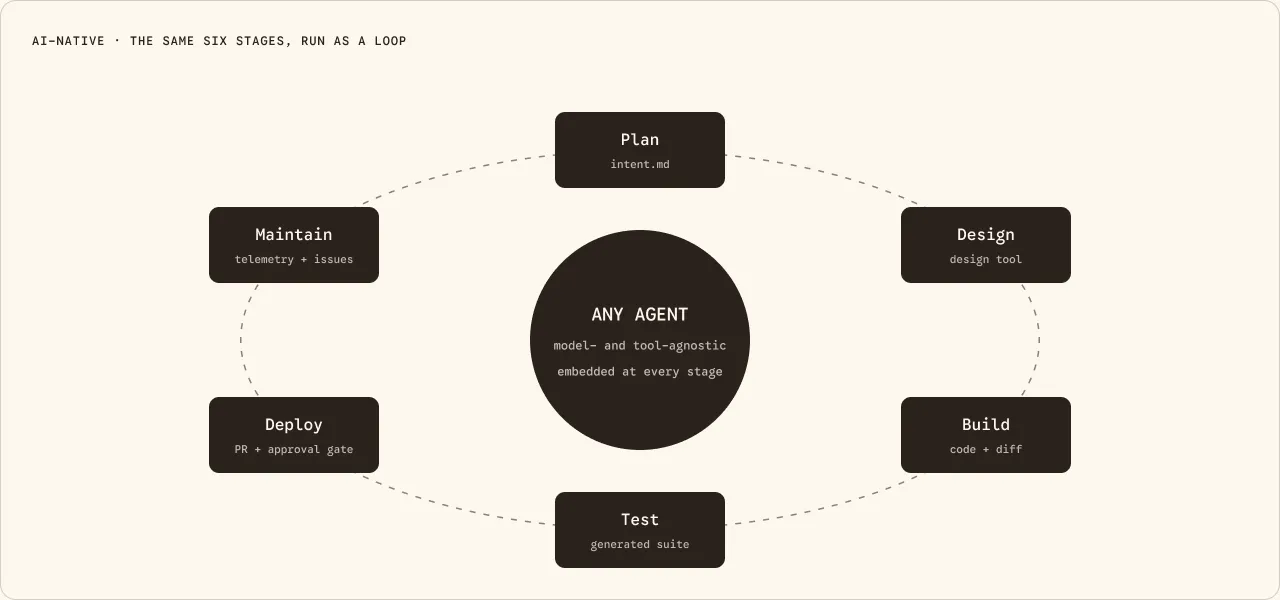
Agents sit inside every stage, not at the end of one. Each stage hands the next a committed file, and the loop closes back into Plan.
academy.claude.com/courses/ai-native-sdlc-playbook/introduction (opens in a new tab)What is intent.md?
AGENTS.md says how this project gets built. It says nothing about what you are building tonight, or why. intent.md is the other file: the brief. The problem, the outcome, who it is for, how it should be structured, what constrains it, and what you have not decided yet. Its job is to make the Plan stage of the lifecycle more efficient.
# Intent: claims status self-serviceAuthor: J. Ortiz (claims operations). Status: draft.## ProblemCustomers phone the contact center to ask where their claim is.Handlers spend roughly a third of call time on status-only queries.## Proposed outcomeCustomers see claim status, next step and expected date in the portal.## Affected users and systemsClaims handlers, portal team, claims-core API.## ConstraintsNo new PII in the portal session. Existing authentication only.## Open questionsDo third-party loss adjusters need access too?Build the skill
A skill is a SKILL.md file, written in plain markdown, an open format both Claude and ChatGPT read. /skill-creator scaffolds one from a description, and it works in either app. Point it at Anthropic’s Capture Intent lesson, linked below, so the format comes from the source rather than from memory.
/skill-creator create a skill capture-intent to help me create an intent.md document(see https://academy.claude.com/courses/ai-native-sdlc-playbook/capture-intent). disable model invocation.Build it in the chat app
Run /skill-creator in Claude on the web or in the desktop app, or in ChatGPT. Either one works. It finishes by offering to install the skill to your account, so it is there for every project this semester, on whatever machine you sign in to.
Read the SKILL.md it wrote, and fix it
The scaffold is a draft. The questions it asks you and the shape of the file it promises are yours to correct before you run it on real work.
Run it, then correct it
Run the skill against tonight’s source material and answer its questions: the order of the sections, what a reader lands on this page for, and what deserves special treatment instead of being styled like body copy. Then open intent.md and correct it. Commit it before you build anything.
/capture-intent i want to create an intent.md for a task to present thiscontent in a readable fashion: https://ct390.fitnyc.dev/docs/source.mdThe check before you build
Hand intent.md to someone who has not read the source. They should be able to say what page you are about to build and who it is for. If they cannot, the intent is not finished.
PART 4 · GOOD PROMPTS VS. BAD PROMPTS
LECTUREGood prompts vs. bad prompts
Glitch animation
Every prompt below asked the agent for the same thing: a glitch transition when the site switches from page view to slides view. The only variable is how the ask was written.
BEFORE · THE STARTING POINT
NO PROMPT YET
The toggle jumps straight into the slides view with nothing in between.
— no prompt —
WORST PROMPT · TAKE 1
8:44 PM EDT → 8:51 PM EDT · 7 MIN
Names the button, not the moment. The agent read “on the toggle button” literally and put the glitch on hover.
Add a glitch animation to the page slides toggle button
WORST PROMPT · TAKE 2 (FOLLOW-UP)
8:57 PM EDT → 9:02 PM EDT · 5 MIN
The correction supplies the word the first prompt was missing. That word is transition, and saying it costs a second run.
I did not mean on hover, I meant a glitch animation when it transitions into the slides view
OKAY PROMPT · TAKE 1
9:22 PM EDT → 9:30 PM EDT · 8 MIN
Short, but it names the effect and the moment it belongs to. The fastest run (8 min), but still looks a bit off.
add a glitch transition when the page switches from page view to slides view
“YOU ARE AN EXPERT” · BLOOPER
10:10 PM EDT → 10:27 PM EDT · 17 MIN
Same role-play framing as the next card, minus one word. Without “glitch” the agent picks its own animation and spends seventeen minutes on the wrong effect. A role does not replace the noun you actually want.
You are a motion graphics expert. Add an animation for when the website transitions from page view to slides view.
“YOU ARE AN EXPERT” · TAKE 1
10:35 PM EDT → 10:54 PM EDT · 19 MIN
The blooper with the missing word restored. It works, but takes nineteen minutes to execute.
You are a motion graphics expert. Add a glitch effect animation for when the website transitions from page view to slides view.
BEST PROMPT FOR MY VISION · TAKE 1
7:21 PM EDT → 7:36 PM EDT · 15 MIN
It gives a sequence rather than adjectives: toggle animation first, then the glitch at the end of its travel, then the view change. Asks the agent to use CanvasUI specifically, and uses their “Copy for AI” feature.
canvasui.dev/docs/components/glitch (opens in a new tab)We are going to be refining the website animations and interactivity. We’ll start with Page to slides toggle button. Before showing the slide add a toggle animation that moves the background from pages to slides, then when the toggle reaches the other end use the canvasui glitch effect prompt from the code snippet to trigger that effect. Finally, as the glitch effect happens transition into the slides view. Small note but needs to be cursor pointer.
# Canvas UI: Glitch (React)

Broadcast glitch bursts tear this page into shifted slices with RGB splits and corrupted blocks, then let it settle back to a clean read. Tune the timing, tear strength, and noise. This page is the demo.

## Install

```sh
npx shadcn@latest add @canvas-ui/glitch-react
```

Or copy the standalone source below into your project as Glitch.tsx.

## Current configuration

The component as configured right now in the docs demo (React syntax; prop values apply to every framework):

```tsx
import { Glitch } from "@/components/canvasui/Glitch";

<Glitch
  intensity={1}
  interval={3}
  duration={0.4}
  slices={24}
  shift={30}
  rgbShift={4}
  blocks={0.5}
  noise={0.35}
>
  {/* your content */}
</Glitch>
```

## Props

| Property | Type | Default | Description |
| --- | --- | --- | --- |
| intensity | number | 1 | Overall strength of the glitch (0 to 2). |
| interval | number | 3 | Seconds between glitch bursts. 0 keeps the glitch running constantly. |
| duration | number | 0.4 | How long each burst lasts in seconds. |
| slices | number | 24 | Number of horizontal slices the tear snaps to. Lower is chunkier. |
| shift | number | 30 | How far the torn slices shift sideways, in CSS pixels. |
| rgbShift | number | 4 | Chromatic RGB split during bursts, in CSS pixels. |
| blocks | number | 0.5 | Amount of corrupted block artifacts during bursts (0 to 1). |
| noise | number | 0.35 | Analog noise and scanline flicker during bursts (0 to 1). |
| className | string |  | Classes applied to the wrapper element. |

## Glitch.tsx

```tsx
"use client";

import {
  useEffect,
  useRef,
  useState,
  useSyncExternalStore,
  type ReactNode,
} from "react";

export interface GlitchOptions {
  /** Overall strength of the glitch (0 to 2). */
  intensity?: number;
  /** Seconds between glitch bursts. 0 keeps the glitch running constantly. */
  interval?: number;
  /** How long each burst lasts in seconds. */
  duration?: number;
  /** Number of horizontal slices the tear snaps to. Lower is chunkier. */
  slices?: number;
  /** How far the torn slices shift sideways, in CSS pixels. */
  shift?: number;
  /** Chromatic RGB split during bursts, in CSS pixels. */
  rgbShift?: number;
  /** Amount of corrupted block artifacts during bursts (0 to 1). */
  blocks?: number;
  /** Analog noise and scanline flicker during bursts (0 to 1). */
  noise?: number;
}

export interface GlitchElements {
  /** Canvas with layoutsubtree that hosts the HTML content. */
  source: HTMLCanvasElement;
  /** The element inside the source canvas that gets captured. */
  content: HTMLElement;
  /** Canvas the WebGL effect renders to. */
  output: HTMLCanvasElement;
}

export interface GlitchInstance {
  /** Update effect options live. */
  setOptions: (options: GlitchOptions) => void;
  /** Fire a glitch burst right now. */
  burst: () => void;
  /** Re-read canvas size. Call when the element is resized. */
  resize: () => void;
  /** Stop the loop and release all GPU resources. */
  destroy: () => void;
}

const DEFAULTS: Required<GlitchOptions> = {
  intensity: 1,
  interval: 3,
  duration: 0.4,
  slices: 24,
  shift: 30,
  rgbShift: 4,
  blocks: 0.5,
  noise: 0.35,
};

type PaintableCanvas = HTMLCanvasElement & {
  onpaint?: (() => void) | null;
  requestPaint?: () => void;
};

type ElementImageContext = CanvasRenderingContext2D & {
  drawElementImage?: (element: Element, x: number, y: number) => void;
};

const VERT = `#version 300 es
precision highp float;
layout(location = 0) in vec2 aPos;
out vec2 vUv;
void main () {
  vUv = aPos * 0.5 + 0.5;
  gl_Position = vec4(aPos, 0.0, 1.0);
}`;

const FRAG = `#version 300 es
precision highp float;
in vec2 vUv;
out vec4 outColor;
uniform sampler2D uContent;
uniform vec2 uResolution;
uniform float uSeed;
uniform float uAmp;
uniform float uSlices;
uniform float uShift;
uniform float uRgbShift;
uniform float uBlocks;
uniform float uNoise;
uniform float uMaxX;

float hash12 (vec2 p) {
  vec3 p3 = fract(vec3(p.xyx) * 0.1031);
  p3 += dot(p3, p3.yzx + 33.33);
  return fract((p3.x + p3.y) * p3.z);
}

vec4 page (vec2 p) {
  p.x = clamp(p.x, 0.0005, uMaxX - 0.0005);
  p.y = clamp(p.y, 0.0005, 0.9995);
  return texture(uContent, vec2(p.x, 1.0 - p.y));
}

void main () {
  vec2 uv = vUv;
  if (uv.x > uMaxX) {
    outColor = vec4(0.0);
    return;
  }

  float e = uAmp;
  vec2 guv = uv;

  if (e > 0.001) {
    float band = floor(uv.y * uSlices);
    float pick = hash12(vec2(band, uSeed));
    float tear = step(1.0 - 0.3 * min(e, 1.0), pick);
    float dir = hash12(vec2(band, uSeed + 13.0)) * 2.0 - 1.0;
    guv.x += tear * dir * e * uShift / uResolution.x;

    float sub = floor(uv.y * uSlices * 7.0);
    float micro = hash12(vec2(sub, uSeed + 29.0));
    guv.x += (micro - 0.5) * e * uNoise * 3.0 / uResolution.x;

    vec2 cell = floor(guv * vec2(10.0, uSlices * 0.5));
    float br = hash12(cell + uSeed * 0.0173);
    if (br > 1.0 - 0.14 * uBlocks * min(e, 1.0)) {
      vec2 jump = vec2(
        hash12(cell + uSeed + 3.1) - 0.5,
        hash12(cell + uSeed + 7.7) - 0.5
      );
      guv += jump * vec2(0.08, 0.02) * e;
    }
  }

  float split = uRgbShift * e / uResolution.x;
  vec4 c = page(guv);
  float r = page(guv + vec2(split, 0.0)).r;
  float b = page(guv - vec2(split, 0.0)).b;
  vec4 col = vec4(r, c.g, b, c.a);

  if (e > 0.001 && uNoise > 0.001) {
    float grain = hash12(vUv * uResolution + uSeed * 5.3) - 0.5;
    float row = floor(vUv.y * uResolution.y);
    float flicker = hash12(vec2(row, uSeed + 41.0));
    float lines = step(0.985 - 0.01 * uNoise * e, flicker);
    col.rgb += (grain * 0.22 + lines * 0.35) * uNoise * min(e, 1.0) * col.a;
  }

  outColor = vec4(clamp(col.rgb, 0.0, 1.0) * col.a, col.a);
}`;

export function supportsHtmlInCanvas(): boolean {
  if (typeof document === "undefined") return false;
  const probe = document.createElement("canvas") as PaintableCanvas;
  const ctx = probe.getContext("2d") as ElementImageContext | null;
  return Boolean(
    ctx &&
    typeof ctx.drawElementImage === "function" &&
    typeof probe.requestPaint === "function",
  );
}

export function createGlitch(
  elements: GlitchElements,
  options: GlitchOptions = {},
): GlitchInstance | null {
  const config = { ...DEFAULTS, ...options };
  const { source, content, output } = elements;

  const gl = output.getContext("webgl2", {
    alpha: true,
    depth: false,
    stencil: false,
    antialias: false,
    premultipliedAlpha: true,
  });
  if (!gl || gl.isContextLost()) return null;

  const sourceCtx = source.getContext("2d") as ElementImageContext | null;
  const paintable = source as PaintableCanvas;
  const htmlInCanvas = Boolean(
    sourceCtx &&
    typeof sourceCtx.drawElementImage === "function" &&
    typeof paintable.requestPaint === "function",
  );

  let contentDirty = false;
  let wake = () => {};

  if (htmlInCanvas) {
    paintable.onpaint = () => {
      try {
        sourceCtx!.reset();
        sourceCtx!.drawElementImage!(content, 0, 0);
        contentDirty = true;
        wake();
      } catch {}
    };
  }

  function compile(type: number, text: string): WebGLShader {
    const shader = gl!.createShader(type)!;
    gl!.shaderSource(shader, text);
    gl!.compileShader(shader);
    if (!gl!.getShaderParameter(shader, gl!.COMPILE_STATUS)) {
      console.error("Glitch shader error:", gl!.getShaderInfoLog(shader));
    }
    return shader;
  }

  const vertexShader = compile(gl.VERTEX_SHADER, VERT);
  const fragmentShader = compile(gl.FRAGMENT_SHADER, FRAG);
  const program = gl.createProgram()!;
  gl.attachShader(program, vertexShader);
  gl.attachShader(program, fragmentShader);
  gl.linkProgram(program);

  const uniforms: Record<string, WebGLUniformLocation> = {};
  const count = gl.getProgramParameter(program, gl.ACTIVE_UNIFORMS);
  for (let i = 0; i < count; i++) {
    const info = gl.getActiveUniform(program, i)!;
    uniforms[info.name] = gl.getUniformLocation(program, info.name)!;
  }

  const quad = gl.createBuffer();
  gl.bindBuffer(gl.ARRAY_BUFFER, quad);
  gl.bufferData(
    gl.ARRAY_BUFFER,
    new Float32Array([-1, -1, 1, -1, -1, 1, 1, 1]),
    gl.STATIC_DRAW,
  );
  gl.enableVertexAttribArray(0);
  gl.vertexAttribPointer(0, 2, gl.FLOAT, false, 0, 0);

  const contentTexture = gl.createTexture()!;
  gl.bindTexture(gl.TEXTURE_2D, contentTexture);
  gl.texParameteri(gl.TEXTURE_2D, gl.TEXTURE_MIN_FILTER, gl.LINEAR);
  gl.texParameteri(gl.TEXTURE_2D, gl.TEXTURE_MAG_FILTER, gl.LINEAR);
  gl.texParameteri(gl.TEXTURE_2D, gl.TEXTURE_WRAP_S, gl.CLAMP_TO_EDGE);
  gl.texParameteri(gl.TEXTURE_2D, gl.TEXTURE_WRAP_T, gl.CLAMP_TO_EDGE);
  gl.texImage2D(
    gl.TEXTURE_2D,
    0,
    gl.RGBA,
    1,
    1,
    0,
    gl.RGBA,
    gl.UNSIGNED_BYTE,
    new Uint8Array([0, 0, 0, 0]),
  );

  let contentMaxX = 1;

  function syncCanvasSize() {
    const dpr = Math.min(window.devicePixelRatio || 1, 2);
    const width = Math.max(1, Math.round(output.clientWidth * dpr));
    const height = Math.max(1, Math.round(output.clientHeight * dpr));
    if (output.width !== width || output.height !== height) {
      output.width = width;
      output.height = height;
    }
    contentMaxX = Math.min(
      1,
      Math.max(0.05, content.clientWidth / Math.max(output.clientWidth, 1)),
    );
    if (htmlInCanvas) {
      const cssWidth = Math.max(1, Math.round(source.clientWidth));
      const cssHeight = Math.max(1, Math.round(source.clientHeight));
      if (source.width !== cssWidth * dpr || source.height !== cssHeight * dpr) {
        source.width = cssWidth * dpr;
        source.height = cssHeight * dpr;
      }
      paintable.requestPaint!();
    }
  }

  syncCanvasSize();

  function uploadContent() {
    if (!htmlInCanvas || !contentDirty) return;
    contentDirty = false;
    gl!.bindTexture(gl!.TEXTURE_2D, contentTexture);
    gl!.texImage2D(
      gl!.TEXTURE_2D,
      0,
      gl!.RGBA,
      gl!.RGBA,
      gl!.UNSIGNED_BYTE,
      source,
    );
  }

  let time = 0;
  let burstAt = 0.6;
  let burstSeed = 1;
  let envelope = 0;

  function advanceTimeline(delta: number) {
    time += delta;
    if (config.interval <= 0) {
      envelope = 1;
      return;
    }
    const sinceBurst = time - burstAt;
    const duration = Math.max(config.duration, 0.05);
    if (sinceBurst >= 0 && sinceBurst < duration) {
      const tail = 1 - Math.pow(sinceBurst / duration, 2);
      envelope = tail * (0.7 + 0.3 * hash(burstSeed + Math.floor(time * 24)));
    } else {
      envelope = 0;
      if (sinceBurst >= duration) {
        burstAt = time + Math.max(config.interval, 0.3) * (0.75 + 0.5 * Math.random());
        burstSeed = Math.floor(Math.random() * 1000);
      }
    }
  }

  function hash(n: number) {
    const s = Math.sin(n * 127.1) * 43758.5453;
    return s - Math.floor(s);
  }

  function render() {
    uploadContent();
    const dpr = output.width / Math.max(output.clientWidth, 1);
    const amp = envelope * Math.max(config.intensity, 0);
    gl!.useProgram(program);
    gl!.activeTexture(gl!.TEXTURE0);
    gl!.bindTexture(gl!.TEXTURE_2D, contentTexture);
    gl!.uniform1i(uniforms.uContent, 0);
    gl!.uniform2f(uniforms.uResolution, output.width, output.height);
    gl!.uniform1f(uniforms.uSeed, Math.floor(time * 24) + burstSeed);
    gl!.uniform1f(uniforms.uAmp, amp);
    gl!.uniform1f(uniforms.uSlices, Math.max(config.slices, 3));
    gl!.uniform1f(uniforms.uShift, Math.max(config.shift, 0) * dpr);
    gl!.uniform1f(uniforms.uRgbShift, Math.max(config.rgbShift, 0) * dpr);
    gl!.uniform1f(uniforms.uBlocks, Math.min(Math.max(config.blocks, 0), 1));
    gl!.uniform1f(uniforms.uNoise, Math.min(Math.max(config.noise, 0), 1));
    gl!.uniform1f(uniforms.uMaxX, contentMaxX);
    gl!.bindFramebuffer(gl!.FRAMEBUFFER, null);
    gl!.viewport(0, 0, output.width, output.height);
    gl!.drawArrays(gl!.TRIANGLE_STRIP, 0, 4);
  }

  let raf = 0;
  let lastTime = performance.now();
  let destroyed = false;
  let running = false;
  let visible = true;

  const motionQuery = window.matchMedia("(prefers-reduced-motion: reduce)");
  let reducedMotion = motionQuery.matches;

  function frame(now: number) {
    if (destroyed) return;
    if (!visible) {
      running = false;
      return;
    }
    const delta = Math.min(Math.max((now - lastTime) / 1000, 0), 1 / 30);
    lastTime = now;
    const wasActive = envelope > 0;
    if (!reducedMotion) advanceTimeline(delta);
    else envelope = 0;
    if (envelope > 0 || wasActive || contentDirty) render();
    if (reducedMotion && !contentDirty) {
      running = false;
      return;
    }
    raf = requestAnimationFrame(frame);
  }

  function start() {
    if (destroyed || running || !visible) return;
    running = true;
    lastTime = performance.now();
    raf = requestAnimationFrame(frame);
  }

  wake = start;
  start();

  function onMotionChange() {
    reducedMotion = motionQuery.matches;
    start();
  }
  motionQuery.addEventListener("change", onMotionChange);

  const observer = new ResizeObserver(() => {
    syncCanvasSize();
    start();
  });
  observer.observe(output);
  observer.observe(content);

  const intersection = new IntersectionObserver((entries) => {
    visible = entries[entries.length - 1]?.isIntersecting ?? true;
    if (visible) start();
  });
  intersection.observe(output);

  return {
    setOptions(next) {
      if (
        !Object.entries(next).some(
          ([key, value]) => config[key as keyof GlitchOptions] !== value,
        )
      )
        return;
      Object.assign(config, next);
      start();
    },
    burst() {
      burstAt = time;
      burstSeed = Math.floor(Math.random() * 1000);
      start();
    },
    resize() {
      syncCanvasSize();
      start();
    },
    destroy() {
      destroyed = true;
      cancelAnimationFrame(raf);
      observer.disconnect();
      intersection.disconnect();
      motionQuery.removeEventListener("change", onMotionChange);
      gl!.deleteTexture(contentTexture);
      gl!.deleteProgram(program);
      gl!.deleteShader(vertexShader);
      gl!.deleteShader(fragmentShader);
      gl!.deleteBuffer(quad);
      if (htmlInCanvas) paintable.onpaint = null;
    },
  };
}

export interface GlitchProps extends GlitchOptions {
  children: ReactNode;
  className?: string;
  style?: React.CSSProperties;
}

const emptySubscribe = () => () => {};

export function Glitch({ children, className, style, ...options }: GlitchProps) {
  const sourceRef = useRef<HTMLCanvasElement>(null);
  const contentRef = useRef<HTMLDivElement>(null);
  const outputRef = useRef<HTMLCanvasElement>(null);
  const instanceRef = useRef<GlitchInstance | null>(null);
  const [initialOptions] = useState(options);
  const [failed, setFailed] = useState(false);

  const supported = useSyncExternalStore(
    emptySubscribe,
    supportsHtmlInCanvas,
    () => false,
  );
  const native = supported && !failed;

  useEffect(() => {
    const source = sourceRef.current;
    const content = contentRef.current;
    const output = outputRef.current;
    if (!source || !content || !output) return;
    instanceRef.current = createGlitch(
      { source, content, output },
      initialOptions,
    );
    if (native && !instanceRef.current) setFailed(true);
    return () => {
      instanceRef.current?.destroy();
      instanceRef.current = null;
    };
  }, [initialOptions, native]);

  useEffect(() => {
    instanceRef.current?.setOptions(options);
  });

  return (
    <div className={className} style={{ position: "relative", ...style }}>
      <canvas
        ref={sourceRef}
        // @ts-expect-error experimental html-in-canvas attribute
        layoutsubtree="true"
        suppressHydrationWarning
        style={
          native
            ? { position: "absolute", inset: 0, width: "100%", height: "100%" }
            : { display: "none" }
        }
      >
        {native ? (
          <div
            ref={contentRef}
            style={{
              position: "relative",
              width: "100%",
              height: "100%",
              overflow: "auto",
            }}
          >
            {children}
          </div>
        ) : null}
      </canvas>
      {!native ? (
        <div
          ref={contentRef}
          style={{
            position: "relative",
            width: "100%",
            height: "100%",
            overflow: "auto",
          }}
        >
          {children}
        </div>
      ) : null}
      <canvas
        ref={outputRef}
        aria-hidden
        style={{
          position: "absolute",
          inset: 0,
          width: "100%",
          height: "100%",
          pointerEvents: "none",
        }}
      />
    </div>
  );
}


export default Glitch;
```
PART 5 · BUILD A PAGE ABOUT HTML/CSS/JAVASCRIPT
LABBuild a page about HTML/CSS/JavaScript
1
Accept the Week 3 assignment
Accepting the assignment on Classroom 50 creates your repository for this week. Everything you build tonight goes in that repo and gets pushed to it, so do this before you open your editor.
classroom50.org/fitnyc-ct390/rapid-prototyping-with-ai/assignments/week-3/accept (opens in a new tab)2
Clone your repo in VS Code
Copy the repository’s HTTPS URL from GitHub, clone it in VS Code, and work in the folder that opens.
Cloning your repo in VS Code
3
Create AGENTS.md and CLAUDE.md
Before you prompt for anything, give the agent its standing instructions. Create AGENTS.md and CLAUDE.md at the root of your project folder, and paste in the text from Part 3 above. Codex reads AGENTS.md and Claude Code reads CLAUDE.md, so writing both means it works for whichever agent you open. Commit them before you start building.
The source
The following file is a beginner’s guide to HTML, CSS and JavaScript.
source.md (opens in a new tab)Your task
Your task is to take this source content and create an index.html file that presents all of the content in a coherent fashion. Ensure there is a HTML, CSS Positioning (both CSS and Tailwind), and JavaScript section, all with working demos.
Structure decisions
Settle these on paper first.
- What is the order? The source’s sequence is one option, not the only one.
- How do you want users to navigate the content?
- What deserves special treatment? Consider what things should not be styled like body copy.
Provide working demos
Every explanation needs a working demo, not a picture of one. Any styling examples should show both regular CSS and Tailwind. JavaScript sections should have working demos.
Things worth pushing for
Code blocks
Show the regular CSS and Tailwind equivalents clearly, side by side where that helps.
Comparison table
Some of the source reads better as a table than as prose: the three layers, the position values, the event list. Pull one out and give it a treatment that is clearly not body copy.
Navigation
A sticky header or a jump list makes it easier for users to scan content and is important for accessibility.
Icons
Add icons to the page to help users better understand what they are looking at in each section. We recommend using Lucide.
lucide.dev/icons (opens in a new tab)Mobile friendliness
DevTools → device toolbar. Check to see that your content is still readable on mobile and determine what may need to shift.
Share your prompts
As you work, update the README.md in the assignment repo with a copy of the prompts you gave the agent. It helps us understand your workflow, and gives us something concrete to look at with you if the results are not landing.
Bonus
The source only covers so much. Pick one HTML, CSS or JavaScript topic it leaves out, learn it well enough to explain it in your own words, and add a section for it to your page. CSS animation, a details and summary accordion, dark mode with prefers-color-scheme, form validation, storing state in localStorage. The same rule applies as everywhere else on the page, so write a short explanation and build a demo that runs.
PART 6 · PUBLISH TO GITHUB PAGES
LABPublish to GitHub Pages
Going live
GitHub Pages serves the files on your main branch as a website, at a URL anyone can open. There is no build step to configure and no deploy to run. Every push to main republishes the site. You turn it on once per repository.
1
Enable GitHub Pages
Open the repo on github.com, then Settings → Pages. Set Source to ‘Deploy from a branch’, pick main, and Save. Three clicks, once per repository.
github.com (opens in a new tab)Publishing with GitHub Pages
2
Add the link to your GitHub page to the README
Copy the live URL from the Pages panel and paste it into README.md, near the top. Then commit and push again. That push is also what republishes the site.
DELIVERABLES